PestControlOS Architecture
This document describes the architecture of the PestControlOS Android app and the PestControlOS CRM web app: how they are structured, how data flows between clients and Firebase, and how multi‑company deployment can be organised.
Android architecture
Component diagram
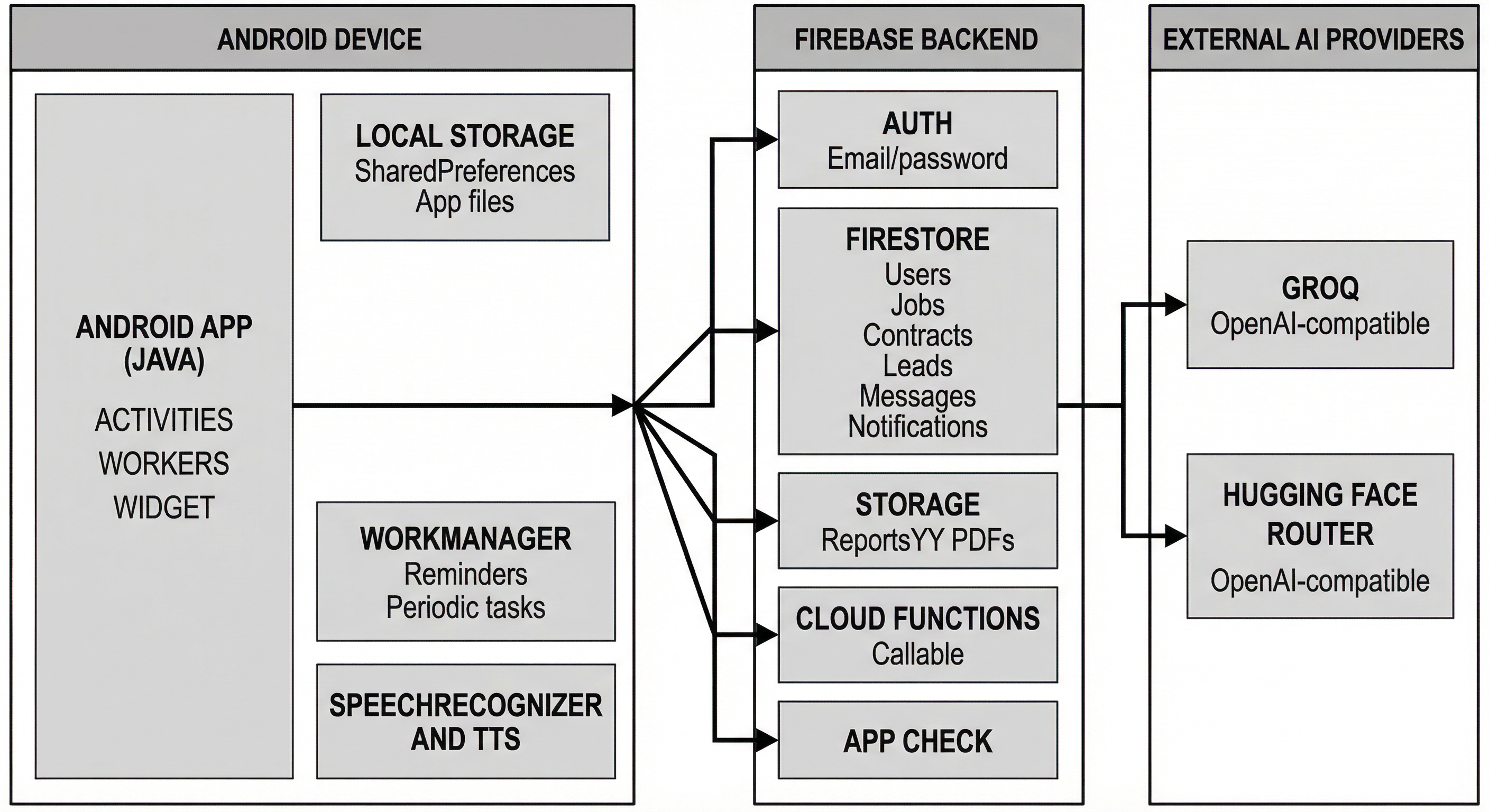
High-level stack: Android app (Java) → Firebase (Auth, Firestore, Storage, optional Cloud Functions, App Check) and external AI providers (Groq, Hugging Face).
High-level stack
| Layer | Technology / responsibility | |-------|-----------------------------| | Client | Android application in Java. Handles UI, business logic, PDF generation, WorkManager tasks and local caching. | | Authentication | Firebase Authentication (email/password). Offline users skip Firebase and operate in local mode. | | Data | Firestore collections for users, jobs, contracts, leads/commission, work view events, messages, notifications and location updates. | | Storage | Firebase Storage for PDF reports, quotations, action forms and service agreements. Files organised by year. | | Automation | Cloud Functions (Node.js) for scheduled cleanup (e.g. message deletion) and future server‑side tasks. | | AI services | External LLMs via Groq API or Hugging Face API. API keys stored in Firestore and accessed by the app. |
Client modules
The Android app is organised into activities and helper classes. Below are the core modules, grouped by area.
Session & directory
| Module | Responsibility | |--------|-----------------| | SessionManager | Loads staff profile (users/{StaffID}), normalises roles, caches session data (including ContractKey), enforces role checks. Resolves UID → StaffID then loads the authoritative profile. | | StaffDirectory | Firestore-backed staff list: fetches users (filtered by 3-digit StaffID), builds ContractKey↔StaffID caches, provides deduplicated owner options for spinners (display = Name when available). No hardcoded staff IDs. |
Scheduling & work
| Module | Responsibility | |--------|-----------------| | WorkViewActivity | Daily calendar with half‑hour slots. Jobs, contract visits, follow‑ups. Add, edit, drag events; combined calendars for admins; in‑app reminders via WorkManager. | | ContractsActivity | Per‑technician contracts with status counters (Behind/Due/Up‑to‑date). Search, add, assign. Admins assign to other technicians. Contract reports linked to Storage. | | JobsActivity / AddJobsActivity | View and create service jobs. Admins assign technicians; technicians accept and complete. Management Jobs module for office tasks. | | FollowUpActivity | Schedule and complete follow‑up visits. Integrated with Work View. |
Reports & documents
| Module | Responsibility | |--------|-----------------| | ReportActivity / PDF generators | Report data → PDFReportGenerator or PDFReportGeneratorWithTemplate. Rodent, general, quotation, action form, bird quotation, service agreement. Password protection, compression, optional signatures/images. | | PdfTemplateSettingsActivity | Offline users build custom headers (logos, header blocks, watermarks). Templates saved locally via PdfTemplateStorage. | | ServiceAgreementActivity | Service contract details + signature fields → PDF via ServiceAgreementGenerator. | | GeneralQuotationActivity | Quotation line items (4pt/6pt/8pt/12pt) → PDF. | | BirdQuotationActivity | Bird‑control quotations with optional 30% deposit; company contact from staff profile. |
Leads, messaging & notifications
| Module | Responsibility | |--------|-----------------| | GenerateLeadsActivity | Add leads with commission details. Admin: mark invoices paid, update materials costs. | | MessagingActivity & conversations | Firestore 1:1 and group chat. Messages urgent (not auto‑deleted) or non‑urgent (cleaned by Cloud Functions). Conversation IDs from participant ContractKeys; group for team chat. | | NotificationsActivity | User’s in‑app notification inbox. Deep linking into other modules. |
Admin & location
| Module | Responsibility | |--------|-----------------| | LocationFinderActivity | Admin‑only: view technicians’ last known locations. Reads last_locations in Firestore or local cache when offline. | | SearchActivity | Admin‑only global search across contracts, jobs, leads and reports. | | EnvironmentSelectionActivity | Choose Toxic vs Non‑Toxic ERA, then launch the corresponding ERA activity. |
Background workers
| Module | Responsibility | |--------|-----------------| | InAppReminderWorker | Schedules and shows in‑app reminders before jobs, visits and follow‑ups. | | LastLocationUpdateWorker | Publishes the device’s last known GPS to Firestore every 15 minutes. | | LastLocationCleanupWorker | Deletes location records older than 30 minutes; caches last location locally for offline use. |
Helpers
Smaller helpers (ActiveUserContext, TenantBranding, etc.) handle theming, user details and brand customisation. ActiveUserContext is scoped by Firebase UID so cached identity does not leak across logins on the same device.
Data model and identity
Firestore collections
Collections are grouped below by area.
Users & identity
| Collection | Purpose | |------------|---------| | users/{StaffID} | Authoritative staff profile: Role, Name, Email, Number, ContractKey, optional Can* flags. | | users/{uid} | Maps Firebase Auth UID → StaffID. Used on login to resolve staff record. |
Work & contracts
| Collection | Purpose | |------------|---------| | {ContractKey} Contracts/{contractId} | Contracts assigned to a technician. Client name, address, status counters, last/next visit. | | JobWork/{jobId} | Service jobs from Jobs or Work View. Customer details, issues, acceptance/completion, follow‑up. Assigned technician = ContractKey. | | user_workview/.../{eventId} | Work View events (jobs, contracts, follow‑ups) by technician. Start/end, type, metadata. |
Leads, notifications & messaging
| Collection | Purpose | |------------|---------| | Leads/{leadId} | Leads with commission, invoice number, payment status, materials cost. | | notifications/{StaffID}/items/{itemId} | In‑app notifications per staff. Title, body, timestamp, action metadata (deep link). | | messages/{conversationId}/{messageId} | Chat messages. Sender, content, timestamp, urgency/retention flag. |
Location & config
| Collection | Purpose | |------------|---------| | last_locations/{userKey} | GPS updates for admins. Latitude, longitude, accuracy, timestamps. | | AI-Chat/AI-API | Hugging Face token (KEY) and Groq key (key-grog). Only super_admin (or authorised admin) may read/write. |
Local (not Firestore)
| Collection | Purpose | |------------|---------| | pdf_template/ (local) | Saved offline PDF templates. Local only (not Firestore). |
Identity resolution
On login: resolve UID → StaffID (via users/{uid} or email match), then load users/{StaffID} and populate SessionManager with Role, ContractKey and permissions. ContractKey is used for spinners (assigned tech/owner), message routing, work view assignment and contract collections; display names come from Firestore. On logout, session data, staff caches, work view cache, widget cache and location cache are cleared so the next user on the same device does not see the previous user’s identity.
Offline mode
When the user chooses Offline login, no Firestore or Storage access occurs. Data is read/written from local SQLite, SharedPreferences and the file system. The offline user has no staff profile and no role permissions. Only report generation and viewing local PDFs are available. When returning online, users must log in normally to upload or sync data.
Reports and PDF templates
Built‑in templates
- Rodent reports: initial, routine, call‑out, external. Common layout with species, site inspection, recommendations, optional photos.
- General reports: 4‑, 6‑, 8‑, 12‑point forms with narrative and tables.
- Action forms: password‑protected; optional signatures and images.
- Quotations: point‑based and bird‑specific. Bird: optional 30% deposit, company email/phone from user profile. General: line items and VAT.
- Service agreements: signature fields for technician and client; generated via ServiceAgreementGenerator.
All PDFs use iText, are compressed automatically and can be encrypted with an owner password. After save: View, Share or (if logged in) Upload. Offline users cannot upload; they can upload later from Stored Reports.
Offline PDF template (“My Template”)
Offline users can customise report headers in PdfTemplateSettingsActivity:
| Field | Description | |-------|-------------| | Main header text | String (e.g. company name). Colour: blue, black, dark gray, red or green. | | Logo | Image from device storage, 200×200 px above main header. | | Watermark | Optional watermark text or image. | | Header blocks | Ordered list of text/image blocks (H1, H2, body). |
Templates are saved as named templates in pdf_template/ and referenced by ID. Create Report (offline only) offers Use PestControlOS Template or Use My Template. Logged‑in users always use the fixed PestControlOS template.
Location sharing
Implemented on the client via WorkManager:
- LastLocationUpdateWorker: periodic (every 15 minutes). Fused location provider → write to
last_locations/{userKey}(lat, lng, accuracy, timestamps). userKey from ContractKey. Copy cached in SharedPreferences for offline. - LastLocationCleanupWorker: every 30 minutes. Delete document if
clientTimestampMsolder than 30 minutes. - LocationFinderActivity (admin‑only): reads last location from Firestore or local cache and displays on map. Firestore rules should restrict reads to authorised admins.
The location module can be disabled by withholding GPS permission or removing WorkManager scheduling.
Messaging and notifications
Messaging
Messages under messages/{conversationId}/{messageId}. Conversation ID from participants’ ContractKeys; group for team chat. Each message: senderId, content, timestamp, urgent (boolean; urgent messages are not auto‑deleted). MessagingActivity and MessagingConversationsActivity handle list UI. Input can use dictation (DictateEditText).
Notifications
Notification records are created for key events: new jobs, contract assignments, lead updates, etc. Structure: title, body, timestamp, type, optional payload for deep linking. Written to primary recipient’s notifications/{StaffID}/items and fanned out to admin inboxes for oversight. Firestore rules restrict each user to their own notifications. No FCM or system notifications; NotificationUtils schedules reminders and in‑app pop‑ups.
AI integration
- Chat (ChatActivity): sends prompts to Groq API or Hugging Face API depending on key in Firestore. Keys in
AI-Chat/AI-API: KEY (Hugging Face), key-grog (Groq). Only super_admin (or authorised admin) updates via Settings. Replies plain text (no markdown). Token length limited for API quotas. - AI Fix: in Create Report and Action Form. Selected text is sent to the same LLM and replaced with improved version (professional, correct grammar, no filler). Offline users cannot use AI Fix.
API keys must be kept private and rotated regularly. Monitor usage and costs via provider consoles.
Automation and background tasks
| Worker / function | Purpose | |-------------------|---------| | InAppReminderWorker | Reminders ~30 minutes before Work View events. | | WorkViewPopupReminderWorker | Pop‑ups when an event becomes due. | | WorkViewWidgetHelper | Updates home screen widget with next three jobs. | | LastLocationUpdateWorker | Publish location to Firestore and cache locally. | | LastLocationCleanupWorker | Delete stale location updates. | | Cloud Function: message cleanup | When deployed, deletes non‑urgent messages older than ~30 minutes. |
Scheduled via Android WorkManager or Cloud Functions. Disable by removing their scheduling calls.
Key workflows (data flow)
Job assignment
- Admin creates job (Jobs screen or Work View), selects technician (dropdown = ContractKey from Firestore).
- App writes job to
JobWork/{jobId}and work event to user_workview. - Notification written to
notifications/{StaffID}/itemsand to admin inboxes. - Technician sees job in Work View; WorkManager schedules reminder.
Report generation
- User completes form (rodent, general, quotation, action form, service agreement). Optional images and signatures.
- Generator (PDFReportGenerator, BirdQuotationPDFGenerator, ServiceAgreementGenerator, etc.) builds PDF with iText. Offline + My Template: PDFReportGeneratorWithTemplate applies custom headers/watermarks.
- PDF compressed and optionally encrypted with owner password.
- Success dialog: View, Share, (if logged in) Upload. Upload → Storage
ReportsYY/and optional Firestore metadata.
Location update
- Every 15 min: LastLocationUpdateWorker gets last known location → write to
last_locations/{userKey}; update local cache. - Every 30 min: LastLocationCleanupWorker deletes document if older than 30 minutes.
- Admin opens Location Finder → read document or cache → show marker on map.
Leads and commission
- Technician adds lead → document to
Leads/{leadId}with default payment status and materials cost. - Admins edit via View Leads (payment status, materials cost); app may trigger notification to assigned technician.
- Commission reports/invoices generated outside app (future: commission PDFs via iText).
Messaging and notifications
- User sends message → new document under
messages/{conversationId}/{messageId}. Non‑urgent messages may be deleted by Cloud Function after timeout. - Event (job created, contract assigned, lead updated, etc.) → notification record for relevant users →
notifications/{StaffID}/items. Home screen badge and NotificationsActivity list. Tap → deep link to appropriate screen.
Multi‑company deployment options
Option A: Separate Firebase projects (recommended)
One Firebase project per client company. Replace logo, app name and package name per build (e.g. build-with-env scripts). Clean data isolation, simpler rules, independent scaling. Same codebase, different google-services.json and env.
Option B: Multi‑tenant SaaS
Single Firebase project; add companyId to every document and enforce tenant isolation in Firestore rules. Less operational overhead, more complex rules. Add indexes for queries that filter by companyId; admins only access their tenant. Per‑tenant API keys and branding via TenantBranding and environment variables.
Notes
- The Android app is tightly coupled to Firestore schemas. Changing collection names or document structures requires code changes in StaffDirectory, FirebaseHelper, ReportDatabaseHelper and PDF generators.
- The staff CRM/portal at https://grpcstaff.ie shares the same backend and expects the same Firestore structure. Schema changes must be coordinated with the web portal.
- The updated README is the primary user‑facing documentation. This architecture file complements it with design rationale and data flows.
- Component and sequence diagrams (login, report, AI) are in Mermaid format; see
docs/component_diagram.mmdanddocs/README.mdin the app repository for export to PNG/SVG.
CRM architecture
High-level architecture
The CRM is a browser-based web app that connects to Firebase for authentication and data. It provides role-based UI for admins and technicians, and includes calendar scheduling for jobs and contracts.
Main components
- Frontend Web App (React / Web UI)
- Firebase Authentication
- Firebase Database (Firestore / Realtime DB, depending on current setup)
- Firebase Storage (report files / PDFs)
- Email sending workflow (Gmail-based sharing from the app/admin actions)
Data flow overview
Authentication flow
- User opens CRM
- User signs in using Firebase Authentication
- App fetches user profile and role (admin/tech)
- UI loads correct access and calendar views
Calendar flow
- User or admin creates an event (job/contract assignment)
- Event is saved to Firebase under the assigned user's schedule
- Calendar UI reads events and renders them in the correct color
- Status updates (completed / follow-up) update Firebase and refresh UI
Reports flow
- Reports are generated in the mobile app
- Reports are stored in Firebase Storage (and indexed in DB)
- CRM searches the report index
- Admin views and shares reports to customers via email action
Suggested Firebase structure (logical)
Note: Use the same naming style your project already uses. This is a clean recommended layout.
users
Each user profile:
uidemailnamerole(admin / tech)color(orange / blue / purple)
leads
Lead pipeline items:
leadIdcustomerNameaddressphone/emailstatusestimatedValueconvertedValueassignedTo(optional)notes[]createdAt,updatedAt
jobs
Jobs:
jobIdcustomerNameaddressdescriptiondatestartTimeendTime(optional)assignedTo(uid/email)statusfollowUp(optional object)
contracts
Contracts:
contractIdcustomerNameaddressserviceTypeassignedTo(uid/email or folder-style mapping)statuslastVisitDate(optional)nextVisitDate(optional)notes[]
calendarEvents
(If you separate calendar from jobs/contracts)
eventIdtype(job / contract)refId(jobId or contractId)assignedTodatestartTimeendTimetitleaddresscolorstatus(scheduled / completed)
reportsIndex
Searchable index for stored PDFs:
reportIdcustomerNameaddresstype(report / action form / etc.)datestoragePathtags[](optional)createdBy
commissions
Commission tracking:
commissionIdrefType(lead / job / contract)refIdassignedToamountstatus(pending / paid)createdAt
Frontend structure (clean recommended)
UI pages / routes
/login/dashboard/leads/jobs/contracts/calendar/reports/admin(admin-only settings)
Main UI components
- Navbar / Sidebar
- Calendar component
- Lead pipeline board/table
- Job/Contract forms
- Report search and preview
- User selector (admin only)
Calendar rendering rules
- Show event label: Name + Address + ID
- Jobs include description
- Color depends on assigned user:
- User 1: orange
- User 2: blue
- Admin: purple
Completion behaviour:
- Contract events can be removed from the calendar UI once completed (data stays in Firebase)
- Jobs can optionally prompt a follow-up schedule
Deployment (conceptual)
- Frontend is built and hosted (Firebase Hosting / static host)
- Firebase handles auth, database, and storage
- Admin tools are part of the same web app and restricted by role
Optional add-ons (architecture-ready)
- Notification service (scheduled reminders)
- Analytics summary (pipeline value, conversion rate)
- Separate "calendar database" if you want clean separation from jobs/contracts storage